
Product updates

Follow new updates and improvements to Formlio.

Your dashboard has a fresh new look!

We've redesigned the Formlio dashboard to make it easier to manage and browse your interactive documents.
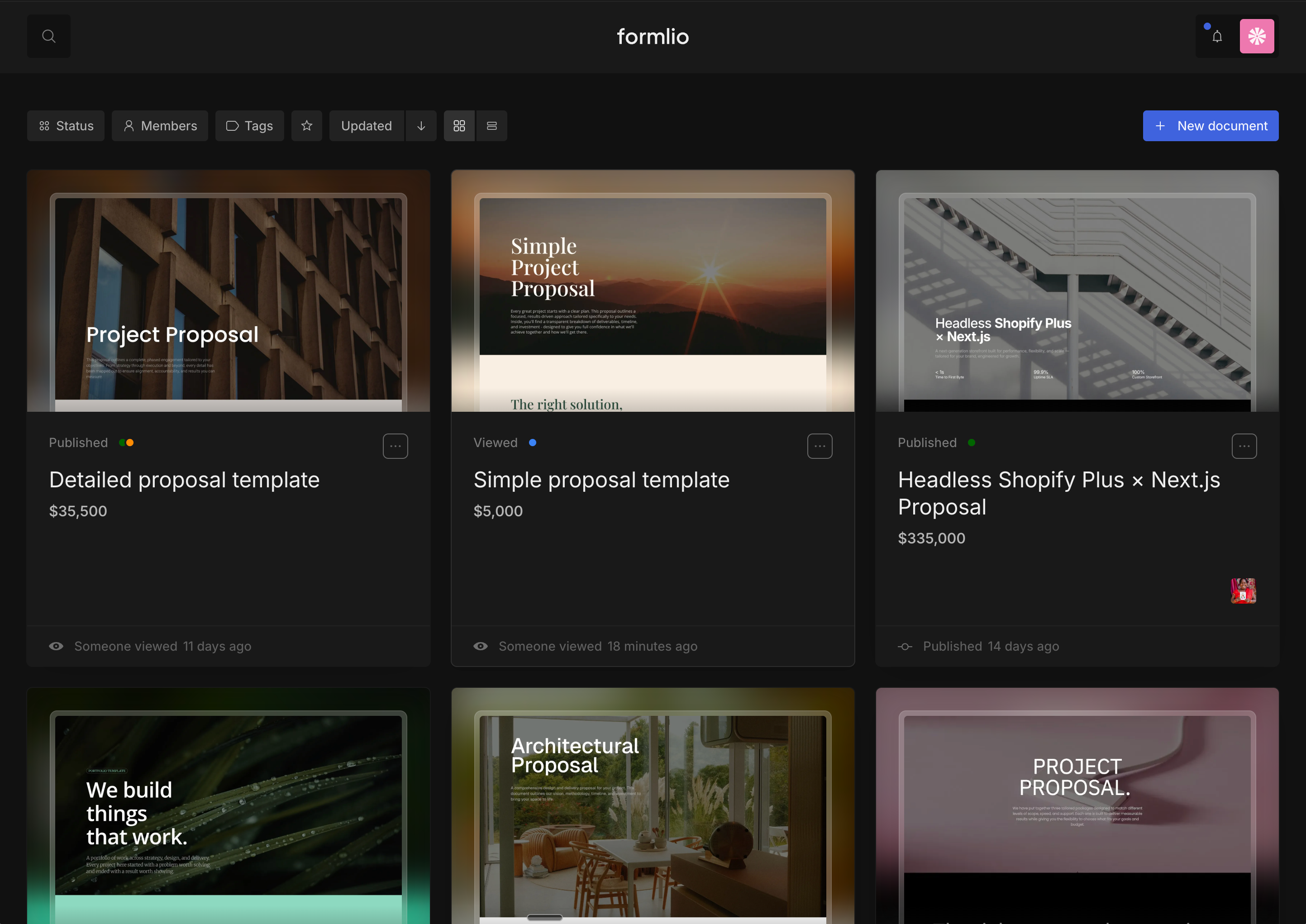
🔹 Dashboard makeover

  • New dashboard layout: Enjoy a cleaner dashboard layout, improved navigation, and a more intuitive way to manage and see your proposals.

  • Project previews: Browse your projects with preview images and proposal prices, so you can see what's in your pipeline at a glance.

  • Grid and list views: Switch between card view and itemised list view depending on how you prefer to browse your projects.

  • Document statuses: See at a glance if a document is Draft, Published, or Viewed with colour-coded status indicators.

  • New user welcome screen: New users now see a clear welcome message with guidance to create their first document when they first land on their dashboard.

🔹 Bug fixes

  • My Library: Saved blocks now display with a preview image.

  • Account creation: Fixed a text contrast issue on Windows/Firefox that made dropdown options hard to read.

New blocks, e-Signatures, templates, and more

🔹 New blocks & editor features

  • Gallery block: Create dynamic image galleries with sliders, scroll animations, and display effects.

  • Big Numbers block: Add animated counters and animated text to highlight key figures in your proposals.

  • Label/tag element: Add badge-style text labels above headings to organise and highlight sections.

  • Header Logo block: Add your logo to proposals by typing "/" and selecting "image" from the dropdown.

  • Hero block carousel arrows: Navigate between images with arrows when multiple images are added to a Hero block.

  • Block Library layout variants: All block layout variants (Slider, Grid, Marquee) now display as individual blocks for easier browsing.

🔹 Signing & sharing

  • Alternative e-Signature methods Sign documents by drawing or typing your signature, in addition to the existing method.

  • Agreement block signer name See the name of the client who approved the document directly on the agreement block.

  • Project templates Select a template when creating a new project to get started faster.

🔹 Bug fixes & improvements

  • Price quote: Fixed tax not showing in total, missing subtotal box, tax auto-applying after deleting groups, and added option to hide Investment Summary in Package pricing.

  • Anonymous analytics: Anonymous form respondents now display with generated names and icons instead of "Anon" IDs.

  • Editor: Fixed hyperlinks prepending Formlio subdomain to external URLs, animated text line breaks not preserving, and batch image upload issues in Media Library.

  • Analytics: Fixed sidebar layout alignment and performance degradation on large documents.

  • Mobile: Fixed navigation menu bar displaying incorrectly with section names barely visible

  • Dashboard: Fixed "Save as template" error, team member removal error, and collaborators without a name now show their email address.

  • Other: Fixed Timeline block duration unit selector not visible, YouTube video black screen, and personal settings region inputs not saving.

What's New in Formlio

⭐ New: Publish & Share Experience

We've completely rethought how you share your interactive documents. You now have 3 sharing modes to choose from based on your needs:

  • Private Link: Only invited people can access the document and collaborate in real time. Others can request access. You get notifications and full named analytics, so you know exactly who viewed and interacted with your document.

  • Public Link: Anyone with the link can view and interact with your document. You get notifications and anonymous analytics to track engagement.

  • Open Link: A public page visible to everyone and indexed by search engines. Ideal for portfolios and prospecting documents. You get anonymous analytics.

💡 For Public and Open links, visitors don't need to authenticate and remain anonymous unless they complete a form (e.g., agreement/approval), which requires authentication. At that point, their identity is captured and they are no longer anonymous.

🛠️ Bug Fixes & Improvements

  • Text Editor: You can now type the "/" character as text without the command menu intercepting it.

  • General improvements: Changes made to the editor, some blocks and Styling Studio to improve user experience.

Earlier updates